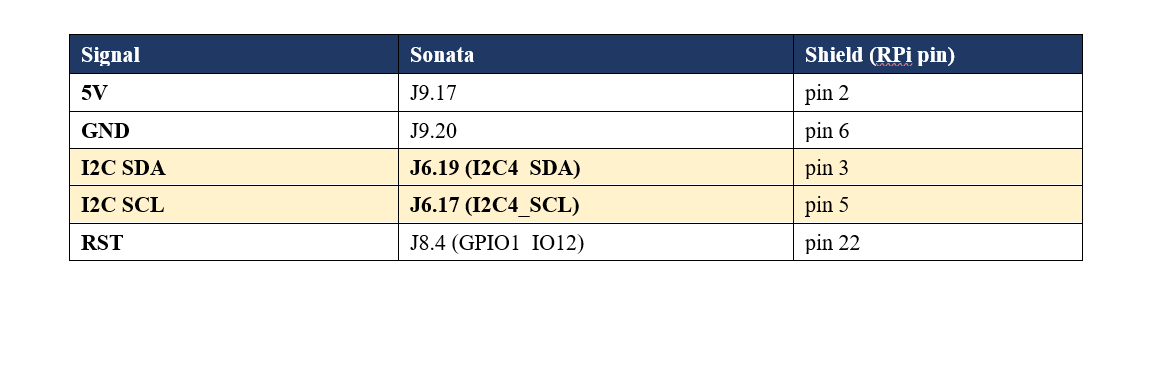
Hi amazing forum . I have the shield with me. From what i have understood in the board only spi is active. How can i do to enable active I2C? Do i need to change somecomponents on the board ? please let me know thanks
Hi, yes, it is possible, but due to the nature of the SI4689, it requires changing a few 0402 resistors, so it involves some tiny soldering. If you’re up for it, I can publish a mini guide.
For the story, when I designed this board, my initial intention was to use I²C because of its practicality and the reduced number of wires. However, I quickly switched back to SPI because each band change—for example, from FM to DAB—requires loading new firmware. This is painfully slow over I²C (around 3 minutes), compared with about 2 seconds over SPI.
However, if you intend to use only one band or switch rarely, the firmware can be loaded into the shield’s external EEPROM, so using I²C is definitely doable.
1 Like
Thanks a lot. Yes we are an electronic company we have a lab where we can easily change the resistor. I rerally appreciate if you can provide the guide. . For us i2c is better since we are testing the shield with a sonata imx95 variscite and we have long cables. with long cables 30 cm spi is not happy so i am able to read just once then the chip of skyworks goes to error. with i2c should be more tolerant
here is the micro guide 
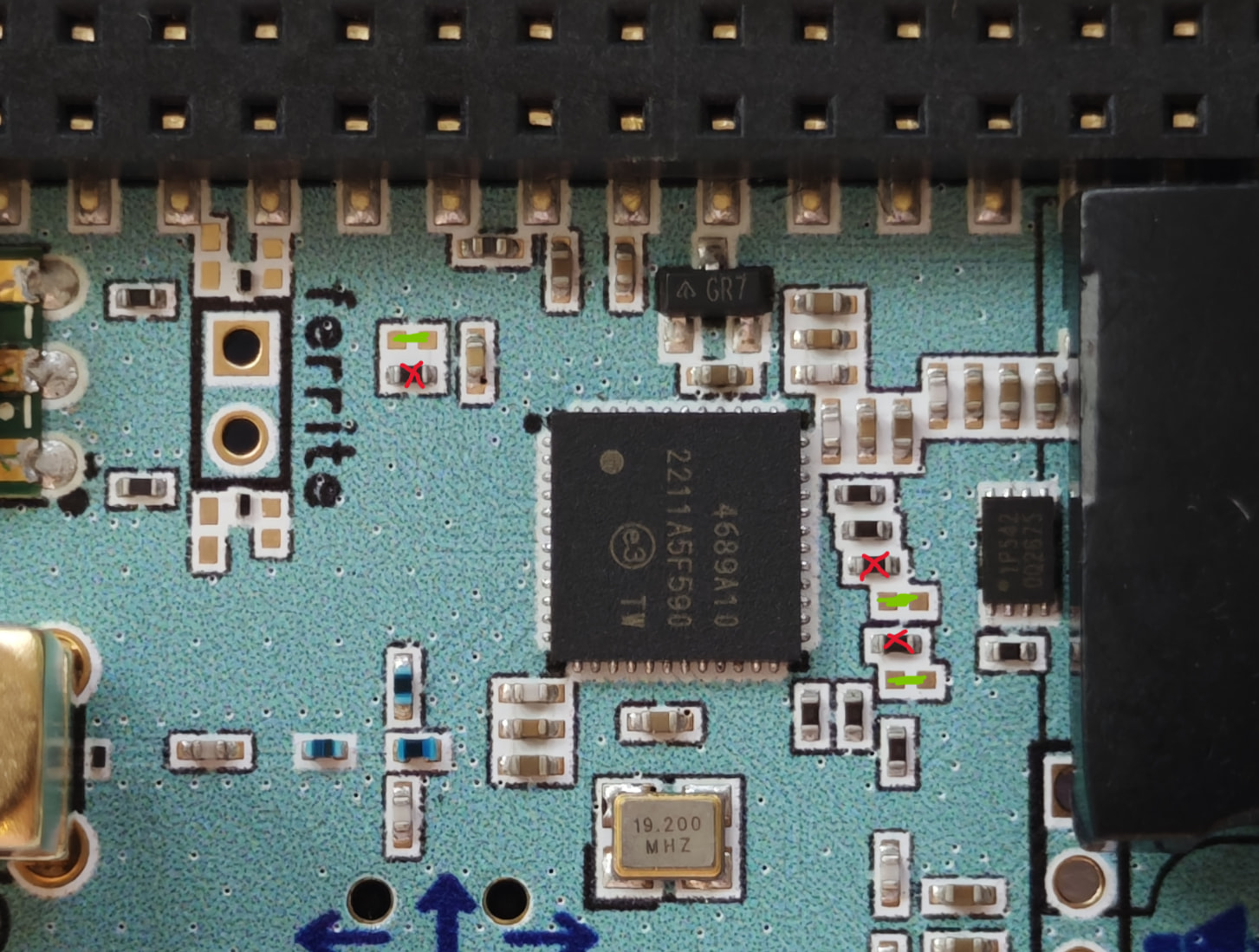
-remove the 3 pcs 0 ohm resistors in red
-make a solder short or reuse the 3 pcs 0 ohm resistors on the 3 green unpopulated resistors
use the standard Raspberry Pi I²C pins: SDA on GPIO2 (physical pin 3) and SCL on GPIO3 (physical pin 5).
First, scan the bus to check whether the radio appears at address 0x64 :
sudo i2cdetect -y 1 0x64 0x67
If you see 64 , go to the Digital-Radio-for-Raspberry-Pi repository and start the test program in I²C mode:
cd Digital-Radio-for-Raspberry-Pi
sudo python3 legacy/dab_radio_i2c_safe2.py --i2c --i2c-bus 1 --i2c-addr 0x64 --patch firmwares/rom00_patch.016.bin --firmware firmwares/dab_radio_6_0_9.bin
1 Like
Thanks a lot. .any pull up to add in the shield or in the sonata imx95 variscite (my side ? thanks)
Dear raspiaudio you wrote this command sudo i2cdetect -y 1 0x64 0x67 , so the address could be also 0x65 ? . .It is working I noticed that sometimes is 0x65 sometimes is 0x67 . Is it normal ? It seems it is changing ? could be thta i am resetting the chip ? what shoud be the volatge level to this pin in the shield ?
| Radio reset | GPIO25 / RST |
22 |
Raspberry Pi to SI4689 I mean if i don’t want to reset has to be 0v or 3,3 volt ? Last question .. in order to test this sudo python3 legacy/dab_radio_i2c_safe2.py can i disconnect this cable of the reset.. thanks a lot |
|---|
short question: is it working with the CLI software we provide for RPI?
sudo python3 legacy/dab_radio_i2c_safe2.py --i2c --i2c-bus 1 --i2c-addr 0x64 --patch firmwares/rom00_patch.016.bin --firmware firmwares/dab_radio_6_0_9.bin
1 Like
I cannot lauch your script until the address is not stable 70:
root@imx95-var-dart:~/Digital-Radio-for-Raspberry-Pi# ^C
echo “=== scan $i ===”; i2cdetect -y -q 7 0x64 0x67; sleep 1; doneo
=== scan 1 ===
0 1 2 3 4 5 6 7 8 9 a b c d e f
00:
10:
20:
30:
40:
50:
60: – – – 67
70:
=== scan 2 ===
0 1 2 3 4 5 6 7 8 9 a b c d e f
00:
10:
20:
30:
40:
50:
60: – – – 67
70:
=== scan 3 ===
0 1 2 3 4 5 6 7 8 9 a b c d e f
00:
10:
20:
30:
40:
50:
60: – 65 – –
70:
=== scan 4 ===
0 1 2 3 4 5 6 7 8 9 a b c d e f
00:
10:
20:
30:
40:
50:
60: – – – 67
70:
=== scan 5 ===
0 1 2 3 4 5 6 7 8 9 a b c d e f
00:
10:
20:
30:
40:
50:
60: – 65 – –
70:
echo “=== scan $i ===”; i2cdetect -y -q 7 0x64 0x67; sleep 1; doneo
=== scan 1 ===
0 1 2 3 4 5 6 7 8 9 a b c d e f
00:
10:
20:
30:
40:
50:
60: – – – 67
70:
=== scan 2 ===
0 1 2 3 4 5 6 7 8 9 a b c d e f
00:
10:
20:
30:
40:
50:
60: – 65 – –
70:
=== scan 3 ===
0 1 2 3 4 5 6 7 8 9 a b c d e f
00:
10:
20:
30:
40:
50:
60: – – – 67
70:
=== scan 4 ===
0 1 2 3 4 5 6 7 8 9 a b c d e f
00:
10:
20:
30:
40:
50:
60: – – – 67
70:
=== scan 5 ===
0 1 2 3 4 5 6 7 8 9 a b c d e f
00:
10:
20:
30:
40:
50:
60: – 65 – –
70:
root@imx95-var-dart:~/Digital-Radio-for-Raspberry-Pi# i would like to know why the address is not satble in your opinion.. thanks