I don’t see this soundcard at all.
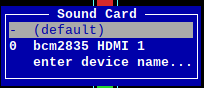
Please help checking and let me know, if this board is broken.
I can order another ultra+ and return this one.
Also, please suggest for my OS and Pi 4, is there is another version of the board you would recommend.
your board is not broken for sure, drivers are not installed, please paste those commands and send logs
I did this already (last night).
Anyways, I will give it another try, just in case second time is a charm.
I downloaded it to a different directory and installed, as the original directory already exists (from last night installation).
Please see below the trails/log:
Sanjay@sanjay:~ $ git clone GitHub - RASPIAUDIO/ultra_install
fatal: destination path ‘ultra_install’ already exists and is not an empty directory.
Sanjay@sanjay:~ $ cd Desktop/
Sanjay@sanjay:~/Desktop $ git clone GitHub - RASPIAUDIO/ultra_install
Cloning into ‘ultra_install’…
remote: Enumerating objects: 6, done.
remote: Counting objects: 100% (6/6), done.
remote: Compressing objects: 100% (3/3), done.
remote: Total 6 (delta 0), reused 0 (delta 0), pack-reused 0 (from 0)
Receiving objects: 100% (6/6), done.
Sanjay@sanjay:~/Desktop $ cd ultra_install/
Sanjay@sanjay:~/Desktop/ultra_install $ sudo bash ultra_install.sh
[sudo] password for sanjay:
- set -o errexit
- set -o pipefail
- set -o nounset
- [[ 0 -ne 0 ]]
- ‘[’ ‘!’ -f /etc/rpi-issue ‘]’
- rm -rf WM8960-Audio-HAT
- git clone GitHub - RASPIAUDIO/WM8960-Audio-HAT: The drivers of [WM8960 Audio HAT] for Raspberry Pi
Cloning into ‘WM8960-Audio-HAT’…
remote: Enumerating objects: 91, done.
remote: Counting objects: 100% (53/53), done.
remote: Compressing objects: 100% (27/27), done.
remote: Total 91 (delta 35), reused 33 (delta 26), pack-reused 38 (from 1)
Receiving objects: 100% (91/91), 69.34 KiB | 461.00 KiB/s, done.
Resolving deltas: 100% (44/44), done. - cd WM8960-Audio-HAT
- apt-get -y update
Hit:1 Index of /debian bullseye InRelease
Hit:2 Index of /raspbian bullseye InRelease
Reading package lists… Done - apt-get -y install raspberrypi-kernel-headers --no-install-recommends --no-install-suggests
Reading package lists… Done
Building dependency tree… Done
Reading state information… Done
The following NEW packages will be installed:
raspberrypi-kernel-headers
The following held packages will be changed:
raspberrypi-kernel-headers
0 upgraded, 1 newly installed, 0 to remove and 0 not upgraded.
E: Held packages were changed and -y was used without --allow-change-held-packages.
Sanjay@sanjay:~/Desktop/ultra_install $
Still the same, no change even after reboot (post re-install).
I will have to try on monday
Any update on the issue here ?
It seems the board is a PoJ.
Indeed there was a kernel change thanks for signaling it, here is the updated version of the guide that is much simpler!
I hope the ULTRA+ will bring you Pure Optimal Joy (PoJ)
1 Like
It seems this ultra++ never works on Pi 4B.
Please be aware.
My test was done on a P4.
Unfortunately, following these instructions do not work on a pi zero 2 W.
I’ve tried all three methods in the guide, and I am using an ULTRA V3, with the latest rasperry pi OS Lite (64-bit).
The device shows up, but no audio comes out and no audio is recorded.
What is the latest guide for installing this on a pi zero 2 W?
Thanks
-August
EDIT: found the issue - make sure to run sudo rpi-update to get the fixed kernel update.
yes as indicated in the guide update / upgrade is needed so the drivers could be found
importantly though:
sudo apt-get update
sudo apt-get upgrade
is not enough, even with the latest Raspberry Pi OS.
sudo rpi-update is also needed, as the firmware/kernel fixes that make this card work are not included in the base image. For a new user like me that wasn’t very obvious - excited to dive into this now!
thanks for sharing! just updated the tutorial
1 Like
I need assistance. I have tried the instructions precisely and still had no success in getting audio to record, or play back out of the built in speakers. I mean… MAYBE the recording is successful, it shows that it’s recording but I have no way of confirming since there is no sound coming out of the built in speakers.
I am using a Pi Zero 2W, Pi OS Lite 64 Bit. I have followed instructions exactly,
sudo apt-get update
sudo apt-get upgrade
sudo rpi-update
I added “dtoverlay=wm8960-soundcard.dtbo” to the end of config.txt via
sudo nano /boot/firmware/config.txt
And it seems to be trying to record when I use
arecord -f cd -d5 > test.wav
but I hear nothing from the speakers when I use
aplay test.wav
I then tried to use both alternate install methods below the first one, again, following instructions exactly. In all 3 cases (installation methods) I have issues, usually alsamixer shows no controls whatsoever for volume or mics and in ALL cases the speakers will not playback any audio, in some cases I get error messages and I cannot say what error messages without going through trying each installation method again one at a time… I guess I will do that and report back here so that it’s known exactly which issues I have with each installation method but. It is very frustrating because I have tried the “ReSpeaker 2 Mic Hat” as well as the Mic Ultra++ and have had no success at all
I’m just trying to get a touch screen working with a Home Assistant Dashboard, as well as HA Assist voice assistant control, and a video security cam all running on the same Pi device, for my daughter in her room. I feel like this shouldn’t be this difficult. But right now I can’t even get the speakers working on my RaspiAudio Mic Ultra++ and that’s only step 1.
I am currently trying to use Pi OS (Full) 64 Bit with desktop OS. That way I can actually follow the written steps exactly, since they are written for the Desktop version of Pi OS and see if that makes any difference.
Also have been struggling with this all day (the orange Ultra++).
I am trying to install it on a Pi Zero 2, I’ve tried 32-bit and 64-bit light and standard desktop and I can get the drivers installed, but no matter what I do, I can’t hear anything from the headphone jack or from the speakers.
Is there a current method that works? I even was able to get the WM8960_Audio_HAT itself to play out of its audio jack, so I promise you I am not completely incompetent >_<
But yeah I feel like I’ve tried everything but there’s no way to get it sound out of the damn headphone jack 
Please help
OMG I got it working!
This is what I did to get it working on my headless Pi Zero 2 and orange Ultra++:
- 64-bit Lite (Bookworm) and edited the settings to add my WiFi and enable SSH.
- Ran the commands in the instructions (sudo apt-get update && sudo apt-get upgrade && sudo rpi-update)
- Added the WM8960 line to the end of the /boot/firmware/config.txt file and rebooted
- Opened alsamixer and pressed F6 to switch to the WM8960 sound card.
- Messed around with most of the Playback channels to make sure that I didn’t accidentally have one of them muted.
- Checked arecord -l and aplay -l (the output looked the same as previous attempts, which seemed like they were right, but I still couldn’t hear anything UNTIL NOW)
- I tried to test the speaker but this command gave me a playback error: speaker-test -l5 -c2 -t wav
- The command that worked was: speaker-test -D plughw:1,0 -t wav -l 1 -c 2
I can’t believe I finally got it working!!! Now let’s see if I can get the line-in working, which was the entire reason I have been working on this!
great!
you can use presets here:
for example
alsactl --file linein.alsa restore
dear all,
what would be the reason, that using the “headphones and external mic” configuration preset (clean installation, following the instructions above. Rpi 4 B , newest OS , drivers etc… I2C enabled…) , only one (trrs headset, where mic is connected to the headphones) out of 9 different trs mics (bought specifically for the purpose of using with this board) works?.. I’m completely destroyed with this result. also, i wanted to use a splitter and have 2 mono mics as a source, but the signal seems to be always mono (using a right input as far as i remember)… is there a preset, which allows stereo input, compining 2 mono or at least the one which keeps the build in mics activated as input channels1-2 and external mic as channel 3?..
thanks for the help in advance.