I’ll try to help you… try starting with a fresh copy of the OS (Trixie) and use the “rescue” method for initialization:
→ git clone GitHub - waveshareteam/WM8960-Audio-HAT: The drivers of [WM8960 Audio HAT] for Raspberry Pi
→ cd WM8960-Audio-HAT
→ sudo ./install.sh
→ sudo reboot
And let me know how it goes…
Did that, same error. It also works fine before the sudo reboot - once rebooted, reverts back and cannot see wm8960 anymore in list of audio devices
This method works perfectly here… I’m still trying to fix the problem… keep me updated…
More test are planned, expect an answer this week
I have just tried today and it is working on external microphone 
first did a full upgrade on Raspberry Pi 5:
sudo apt-get update
sudo apt-get upgrade
sudo rpi-update
then got :
cat /etc/os-release
vcgencmd version
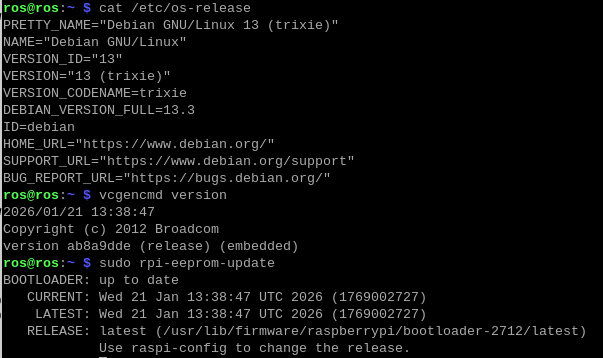
from there:
aplay -l
arecord -l
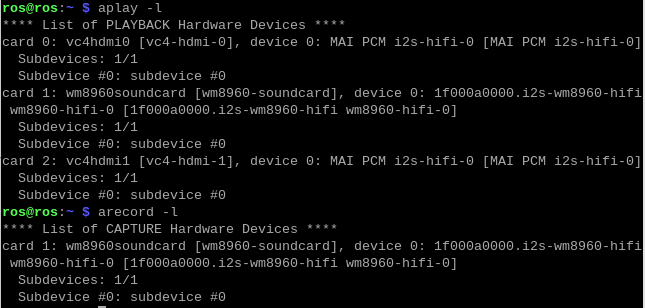
—> Ultra is on card1 for play and record
download the alsa profile to record on ext mic:
curl -o extmic.alsa https://raw.githubusercontent.com/RASPIAUDIO/ULTRA/refs/heads/main/extmic.alsa
restore it :
sudo alsactl -f extmic.alsa restore 1
plugged the cheapest mic on the right jack on the board : https://www.action.com/fr-fr/p/3012643/microphone-portatif/
record (notice the ‘1’ in the command below to target card 1 adjust depending on your card number found previously)
arecord -D plughw:1,0 -c 2 -r 48000 -f S16_LE -t wav test.wav
Now i restore the profile for speaker and headphone output:
curl -o headphone_spk.alsa https://raw.githubusercontent.com/RASPIAUDIO/ULTRA/refs/heads/main/headphones.alsa
sudo alsactl -f headphone_spk.alsa restore
play on jack output (left jack) and speakers
aplay -D hw:1,0 test.wav
I can hear it out loud and clear! let me know if you have something different
Had same problem as dumizor: New Trixie install would automatically recognize driver, but no sound
Tried to install driver, but got linux-header error.
Tried again with another new install, and got sound and mic working. I avoided using: sudo rpi-update