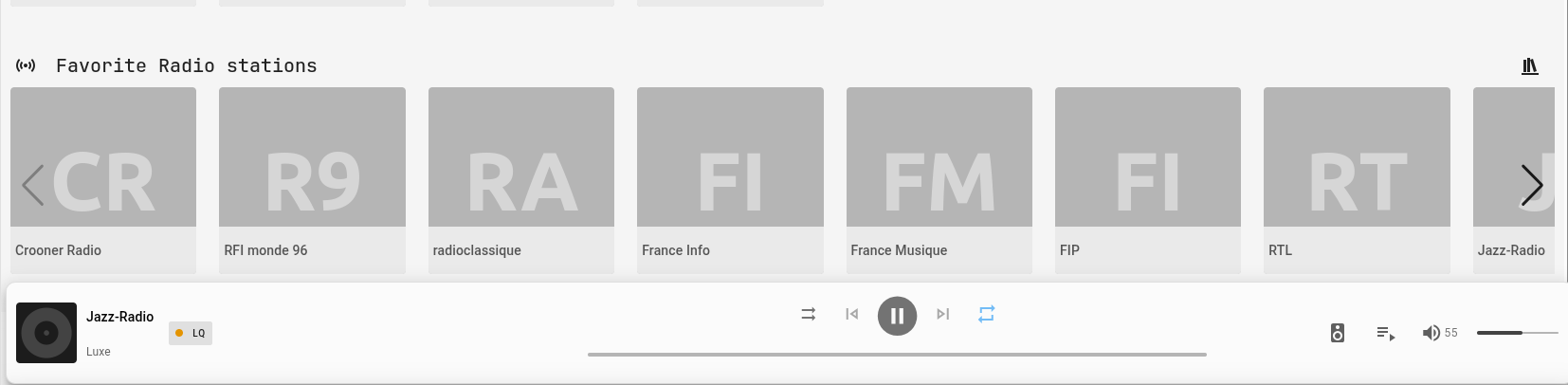
It’s more of a Music Assistant management issue… I think… Keep me posted.
Strange this morning while reloading the config both in ESPhome & Music Assistant, the volume is here again…
Thx…
Anyway, I can’t recompile by myself my own bin file without crashing. I didn’t fine the magic ESPhome version, ESP-IDF version combo to have no crash. If you can precise exactly these versions, I can push more testings with.
Thx a lot.
I just became the owner of a Muse Luxe v2 today, and I can confirm the same issues.
It suddenly reboots with a loud sound at full volume.
I’m using Home Assistant Core 2025.7.4, and I flashed the Muse Luxe v2 using the website https://raspiaudio.github.io/ for the “Home Assistant” application.
I’ve also tried turning the device off and on multiple times.
Additionally, playback lags for about the first 3 seconds when resuming music after a pause or when starting the next track.
The music is being played through Music Assistant in Home Assistant.
BR,
Julian
1 Like
Hi TuxaT!
The problem you’re reporting is difficult to reproduce in our labs! However, we’ve reworked the code and made several changes to make it more robust (notably, the amplifier is now muted when there’s no output to the speakers).
A new version (2025.2.4) has just been released, available at GitHub - RASPIAUDIO/esphomeLuxe and raspiaudio.github.io.
Could you tell us if this resolved your issue?
Best regards,
LR
1 Like
Thanks for your reply!
Unfortunately, due to the seller’s return policy, I was under a bit of time pressure and sent the device back shortly before your response.
BR,
Julian
Hi 
I´ve the same Problems.
When I configured The Muse Luxe V2 i hear an loud Tone an the Device is rebooting…
I´ve installed the GitHub - RASPIAUDIO/esphomeLuxe and the raspiaudio.github.io
If i scale the loudness, the System going to crash and reboot again.
I use the Homeassist OS in the newest Version.
My esphome is in current Version.
Can anybody helps?
kind regards
1 Like
Problem using the new version of esphome and Music Assistant
When luxe_microWW.yaml is compiled with the new version of esphome (2025.8.2), playing a song from Music Assistant causes Luxe to crash after a few seconds. Other features are unaffected (including Radio Browser).
(Temporary) solution: Either compile with esphome version 2025.6.2 or simply load the .bin file from raspiaudio.github.io
Did you clean the build files, mine build fine and deploys on the latest version of esphome it also plays music better then ever, the wake works are hit or miss however
Hi all,
Love the project on my v2! Just a few questions that I was unable to find answers to:
- how do I turn off the boot sound/chime? It’s quite load and I don’t need it.
- can I also use a button push for listening to voice commands? With the wake word, the time spent listening after my voice command is very long, even with aggressive “time to stop listening” setting.
Thanks!
Hi ShMip!
1 ==> It’s easy… you need to delete the 3 lines that correspond to this (little_sound). They’re located in the “start” script (lines 420 and up).
2 ==> It’s less easy. The entire .yaml file is WakeWord-oriented (luxe_microWW.yaml). I’ll try to offer you a version without WW in the coming days…
Thank you for this! No rush on the wake word changes, was just wondering. If you have the time then gladly, but otherwise don’t worry!
I am unable to make the Muse Luxe v2 work with Home Assistant, nothing works but I see all the entities, except the “Wake work{index}” is unavailable, and I did install the openWakeWord.
I managed to get the “Set up voice assistant” to complete but when I say “Okay nabu” it starts listening but never stops 
ESP log:
e[0;36m[D][micro_wake_word:325]: Detected ‘Okay Nabu’ with sliding average probability is 0.89 and max probability is 0.92e[0m
e[0;36m[D][voice_assistant:456]: State changed from IDLE to START_MICROPHONEe[0m
e[0;36m[D][voice_assistant:463]: Desired state set to START_PIPELINEe[0m
e[0;36m[D][micro_wake_word:370]: Stopping wake word detectione[0m
e[0;36m[D][voice_assistant:186]: Starting Microphonee[0m
e[0;36m[D][ring_buffer:034]: Created ring buffer with size 16384e[0m
e[0;36m[D][voice_assistant:456]: State changed from START_MICROPHONE to STARTING_MICROPHONEe[0m
e[0;36m[D][micro_wake_word:378]: State changed from DETECTING_WAKE_WORD to STOPPINGe[0m
e[0;36m[D][voice_assistant:456]: State changed from STARTING_MICROPHONE to START_PIPELINEe[0m
e[0;36m[D][voice_assistant:207]: Requesting starte[0m
e[0;36m[D][voice_assistant:456]: State changed from START_PIPELINE to STARTING_PIPELINEe[0m
e[0;36m[D][voice_assistant:478]: Client started, streaming microphonee[0m
e[0;36m[D][voice_assistant:456]: State changed from STARTING_PIPELINE to STREAMING_MICROPHONEe[0m
e[0;36m[D][voice_assistant:463]: Desired state set to STREAMING_MICROPHONEe[0m
e[0;36m[D][micro_wake_word:273]: Inference task is stopping, deallocating bufferse[0m
e[0;36m[D][micro_wake_word:278]: Inference task is finished, freeing task resourcese[0m
e[0;36m[D][micro_wake_word:378]: State changed from STOPPING to STOPPEDe[0m
e[0;36m[D][voice_assistant:598]: Event Type: 1e[0m
e[0;36m[D][voice_assistant:601]: Assist Pipeline runninge[0m
e[0;36m[D][voice_assistant:598]: Event Type: 3e[0m
e[0;36m[D][voice_assistant:620]: STT startede[0m
e[0;36m[D][main:715]: listening 3 => phasee[0m
e[0;36m[D][main:881]: ==>>>update_lede[0m
e[0;36m[D][light:036]: ‘Raspiaudio Muse Luxe’ Setting:e[0m
e[0;36m[D][light:051]: Brightness: 100%e[0m
e[0;36m[D][light:058]: Red: 0%, Green: 100%, Blue: 0%e[0m
e[0;36m[D][light:109]: Effect: ‘pulse’e[0m
e[0;36m[D][sensor:098]: ‘Battery voltage’: Sending state 4.58434 V with 2 decimals of accuracye[0m
e[0;36m[D][sensor:098]: ‘Battery’: Sending state 100.00000 % with 0 decimals of accuracye[0m
e[0;32m[I][safe_mode:042]: Boot seems successful; resetting boot loop countere[0m
e[0;36m[D][esp32.preferences:142]: Writing 2 items: 0 cached, 2 written, 0 failede[0m
e[0;36m[D][esp-idf:000]e[1;31m[wifi]e[0;36m: I (63511) wifi:e[0m
e[0;36m[D][esp-idf:000]e[1;31m[wifi]e[0;36m: state: run → init (0x4c0)e[0m
e[0;36m[D][esp-idf:000]e[1;31m[wifi]e[0;36m: e[0m
e[0;36m[D][esp-idf:000]e[1;31m[wifi]e[0;36m: I (63513) wifi:e[0m
e[0;36m[D][esp-idf:000]e[1;31m[wifi]e[0;36m: pm stop, total sleep time: 0 us / 57625184 use[0m
e[0;36m[D][esp-idf:000]e[1;31m[wifi]e[0;36m: e[0m
e[0;36m[D][esp-idf:000]e[1;31m[wifi]e[0;36m: I (63514) wifi:e[0m
e[0;36m[D][esp-idf:000]e[1;31m[wifi]e[0;36m: idx:0, tid:0e[0m
e[0;36m[D][esp-idf:000]e[1;31m[wifi]e[0;36m: e[0m
e[0;36m[D][esp-idf:000]e[1;31m[wifi]e[0;36m: I (63515) wifi:e[0m
e[0;36m[D][esp-idf:000]e[1;31m[wifi]e[0;36m: new:<11,0>, old:<11,0>, ap:<255,255>, sta:<11,0>, prof:1, snd_ch_cfg:0x0e[0m
e[0;36m[D][esp-idf:000]e[1;31m[wifi]e[0;36m: e[0m
e[0;33m[W][api.connection:107]: Home Assistant 2025.9.4 (10.0.1.35): Socket operation failed: SOCKET_WRITE_FAILED errno=113e[0m
e[0;33m[W][wifi_esp32:711]: Event: Disconnected ssid=‘krog’ bssid=e[5mC8:7F:54:B8:6B:4Ae[6m reason=‘Association Expired’e[0m
e[0;33m[W][wifi:165]: Connection lost; reconnectinge[0m
e[0;36m[D][wifi:710]: Retrying with hidden networkse[0m
e[0;32m[I][wifi:319]: Connecting to ‘krog’e[0m
e[0;36m[D][esp-idf:000]e[1;31m[wifi]e[0;36m: W (63607) wifi:e[0m
e[0;36m[D][esp-idf:000]e[1;31m[wifi]e[0;36m: Password length matches WPA2 standards, authmode threshold changes from OPEN to WPA2e[0m
e[0;36m[D][esp-idf:000]e[1;31m[wifi]e[0;36m: e[0m
e[0;33m[W][component:188]: Component api set Warning flag: unspecifiede[0m
e[0;36m[D][voice_assistant:456]: State changed from STREAMING_MICROPHONE to STOP_MICROPHONEe[0m
e[0;36m[D][voice_assistant:463]: Desired state set to IDLEe[0m
e[0;33m[W][component:188]: Component wifi set Warning flag: associating to networke[0m
e[0;36m[D][voice_assistant:456]: State changed from STOP_MICROPHONE to STOPPING_MICROPHONEe[0m
e[0;36m[D][esp-idf:000]e[1;31m[wifi]e[0;36m: I (63652) wifi:e[0m
e[0;36m[D][esp-idf:000]e[1;31m[wifi]e[0;36m: new:<11,0>, old:<11,0>, ap:<255,255>, sta:<11,0>, prof:1, snd_ch_cfg:0x0e[0m
e[0;36m[D][esp-idf:000]e[1;31m[wifi]e[0;36m: e[0m
e[0;36m[D][esp-idf:000]e[1;31m[wifi]e[0;36m: I (63653) wifi:e[0m
e[0;36m[D][esp-idf:000]e[1;31m[wifi]e[0;36m: state: init → auth (0xb0)e[0m
e[0;36m[D][esp-idf:000]e[1;31m[wifi]e[0;36m: e[0m
e[0;36m[D][voice_assistant:456]: State changed from STOPPING_MICROPHONE to IDLEe[0m
e[0;33m[W][wifi_esp32:711]: Event: Disconnected ssid=‘krog’ bssid=e[5mC8:7F:54:B8:6B:4Ae[6m reason=‘Auth Expired’e[0m
e[0;33m[W][wifi:666]: Error while connecting to network.e[0m
e[0;36m[D][wifi:710]: Retrying with hidden networkse[0m
e[0;36m[D][esp-idf:000]e[1;31m[wifi]e[0;36m: I (64654) wifi:e[0m
e[0;36m[D][esp-idf:000]e[1;31m[wifi]e[0;36m: state: auth → init (0x200)e[0m
e[0;36m[D][esp-idf:000]e[1;31m[wifi]e[0;36m: e[0m
e[0;36m[D][esp-idf:000]e[1;31m[wifi]e[0;36m: I (64656) wifi:e[0m
e[0;36m[D][esp-idf:000]e[1;31m[wifi]e[0;36m: new:<11,0>, old:<11,0>, ap:<255,255>, sta:<11,0>, prof:1, snd_ch_cfg:0x0e[0m
e[0;36m[D][esp-idf:000]e[1;31m[wifi]e[0;36m: e[0m
e[0;36m[D][sensor:098]: ‘Battery voltage’: Sending state 4.58670 V with 2 decimals of accuracye[0m
e[0;36m[D][sensor:098]: ‘Battery’: Sending state 100.00000 % with 0 decimals of accuracye[0m
e[0;32m[I][wifi:319]: Connecting to ‘krog’e[0m
e[0;36m[D][esp-idf:000]e[1;31m[wifi]e[0;36m: W (69685) wifi:e[0m
e[0;36m[D][esp-idf:000]e[1;31m[wifi]e[0;36m: Password length matches WPA2 standards, authmode threshold changes from OPEN to WPA2e[0m
e[0;36m[D][esp-idf:000]e[1;31m[wifi]e[0;36m: e[0m
With Music Assistant it plays songs but only for short period of time and then it stops, after a while it makes some noise and starts again and then stops forever
This is the error for the Music Assistant:
[E][audio_reader:120][ann_read]: Failed to open URL
[E][speaker_media_player.pipeline:112]: Media reader encountered an error: ESP_ERR_HTTP_CONNECT
[E][speaker_media_player:326]: The announcement pipeline’s file reader encountered an error.
[D][esp-idf:000][ann_read]: E (379043) esp-tls: [sock=56] connect() error: Host is unreachable
[D][esp-idf:000][ann_read]: E (379044) transport_base: Failed to open a new connection: 32772
[D][esp-idf:000][ann_read]: E (379044) HTTP_CLIENT: Connection failed, sock < 0
and here is the ESP log:
e[0;36m[D][media_player:074]: ‘Raspiaudio Muse Luxe’ - Settinge[0m
e[0;36m[D][media_player:081]: Media URL: http://10.0.1.35:8097/flow/Y2fFsZo7/media_player.muse_luxe/bb6b11b3206f4676ad002e40fb01e8da.flace[0m
e[0;36m[D][micro_wake_word:370]: Stopping wake word detectione[0m
e[0;36m[D][media_player:074]: ‘Raspiaudio Muse Luxe’ - Settinge[0m
e[0;36m[D][media_player:084]: Volume: 0.60e[0m
e[0;36m[D][main:881]: ==>>>update_lede[0m
e[0;36m[D][light:036]: ‘Raspiaudio Muse Luxe’ Setting:e[0m
e[0;36m[D][light:058]: Red: 100%, Green: 50%, Blue: 0%e[0m
e[0;36m[D][speaker_media_player:406]: State changed to ANNOUNCINGe[0m
e[0;36m[D][micro_wake_word:378]: State changed from DETECTING_WAKE_WORD to STOPPINGe[0m
e[0;36m[D][micro_wake_word:370]: Stopping wake word detectione[0m
e[0;36m[D][micro_wake_word:273]: Inference task is stopping, deallocating bufferse[0m
e[0;36m[D][micro_wake_word:278]: Inference task is finished, freeing task resourcese[0m
e[0;36m[D][micro_wake_word:378]: State changed from STOPPING to STOPPEDe[0m
e[0;36m[D][ring_buffer:034]e[1;31m[ann_read]e[0;36m: Created ring buffer with size 1000000e[0m
e[0;36m[D][speaker_media_player.pipeline:114]: Reading FLAC file typee[0m
e[0;36m[D][speaker_media_player.pipeline:124]: Decoded audio has 2 channels, 48000 Hz sample rate, and 16 bits per samplee[0m
e[0;33m[W][component:278]: Component speaker.media_player took a long time for an operation (76 ms).e[0m
e[0;33m[W][component:279]: Components should block for at most 30 ms.e[0m
e[0;36m[D][ring_buffer:034]e[1;31m[speaker_task]e[0;36m: Created ring buffer with size 19200e[0m
e[0;36m[D][i2s_audio.speaker:136]: Startinge[0m
e[0;36m[D][i2s_audio.speaker:141]: Startede[0m
e[0;36m[D][main:149]: ====> hardware unmutee[0m
e[0;36m[D][esp32.preferences:142]: Writing 1 items: 0 cached, 1 written, 0 failede[0m
e[0;36m[D][i2s_audio.speaker:148]: Stoppinge[0m
e[0;36m[D][i2s_audio.speaker:154]: Stoppede[0m
e[0;36m[D][main:137]: ====> hardware mutee[0m
e[0;33m[W][wifi_esp32:711]: Event: Disconnected ssid=‘**’ bssid=e[5mC8:7F:54:B8:6B:4Ae[6m reason=‘Association Expired’e[0m
e[0;36m[D][esp-idf:000]e[1;31m[ann_read]e[0;36m: e[0;31mE (181174) transport_base: poll_read select error 113, errno = Software caused connecti
e[0;33m[W][wifi:165]: Connection lost; reconnectinge[0m
e[0;36m[D][esp-idf:000]e[1;31m[ann_read]e[0;36m: e[0;31mE (181176) HTTP_CLIENT: transport_read: error - 57347 | ERRORe[0me[0m
e[0;36m[D][wifi:710]: Retrying with hidden networkse[0m
e[0;32m[I][wifi:319]: Connecting to ‘*****’e[0m
e[0;36m[D][esp-idf:000]e[1;31m[wifi]e[0;36m: Password length matches WPA2 standards, authmode threshold changes from OPEN to WPA2e[0m
e[0;36m[D][esp-idf:000]e[1;31m[wifi]e[0;36m: e[0m
e[0;36m[D][esp-idf:000]e[1;31m[wifi]e[0;36m: I (181166) wifi:e[0m
e[0;36m[D][esp-idf:000]e[1;31m[wifi]e[0;36m: state: run → init (0x4c0)e[0m
e[0;36m[D][esp-idf:000]e[1;31m[wifi]e[0;36m: e[0m
e[0;36m[D][esp-idf:000]e[1;31m[wifi]e[0;36m: I (181167) wifi:e[0m
e[0;36m[D][esp-idf:000]e[1;31m[wifi]e[0;36m: pm stop, total sleep time: 0 us / 101183023 use[0m
e[0;36m[D][esp-idf:000]e[1;31m[wifi]e[0;36m: e[0m
e[0;36m[D][esp-idf:000]e[1;31m[wifi]e[0;36m: I (181167) wifi:e[0m
e[0;36m[D][esp-idf:000]e[1;31m[wifi]e[0;36m: idx:0, tid:0e[0m
e[0;36m[D][esp-idf:000]e[1;31m[wifi]e[0;36m: e[0m
e[0;36m[D][esp-idf:000]e[1;31m[wifi]e[0;36m: I (181168) wifi:e[0m
e[0;36m[D][esp-idf:000]e[1;31m[wifi]e[0;36m: new:<11,0>, old:<11,0>, ap:<255,255>, sta:<11,0>, prof:1, snd_ch_cfg:0x0e[0m
e[0;36m[D][esp-idf:000]e[1;31m[wifi]e[0;36m: e[0m
e[0;36m[D][esp-idf:000]e[1;31m[wifi]e[0;36m: W (181195) wifi:e[0m
e[1;31m[E][speaker_media_player:326]: The announcement pipeline’s file reader encountered an error.e[0m
e[0;33m[W][component:188]: Component api set Warning flag: unspecifiede[0m
e[0;33m[W][component:278]: Component api took a long time for an operation (289 ms).e[0m
e[0;33m[W][component:279]: Components should block for at most 30 ms.e[0m
e[0;33m[W][component:188]: Component wifi set Warning flag: associating to networke[0m
e[0;36m[D][esp-idf:000]e[1;31m[wifi]e[0;36m: I (181580) wifi:e[0m
e[0;36m[D][esp-idf:000]e[1;31m[wifi]e[0;36m: new:<11,0>, old:<11,0>,
After rebuilding and installing with ESPHome, it now properly stops the TTS, everything but everything else still applies
Hi,
We’ll try to help you as best we can…
To do this, we’ll need as much information as possible, especially the versions of HA and Esphome you’re using. Also, your .yaml file if you’re not using luxe_microWW.yaml.
In the meantime, you can directly load the executable (==> raspiaudio.github.io). This version works perfectly with both HA dialogs, Music Assistant, and Radio Browser. It was created with Esphome 2025.7.5 (the latest version, 2025.9.1, has minor issues with Music Assistant).
Best regards,
My ESPHome is 2025.9.1 and my HA is 2025.9.4… did this executable change since yesterday? Because I installed the one from yesterday and it was really bad
Right now I am using the luxe_microWW.yaml (as it is in the GitHub) and building it locally (using the ESPHome 2025.9.1)… but it still has lots of problems with Music Assistant and the “unavailable” Wake word{index}, so not able to use Voice Assistants
I just downloaded the legacy 2025.7.5 and am installing it now, will let you know if it works better.
PS: Do I need to erase the flash before loading the new binary?
Yes Music Assistant now works well, still some noise starting up a song but then it is good
Now the Wake word{index} is still unavailable, so still no Voice Assistants…
With this Voice Assistant…
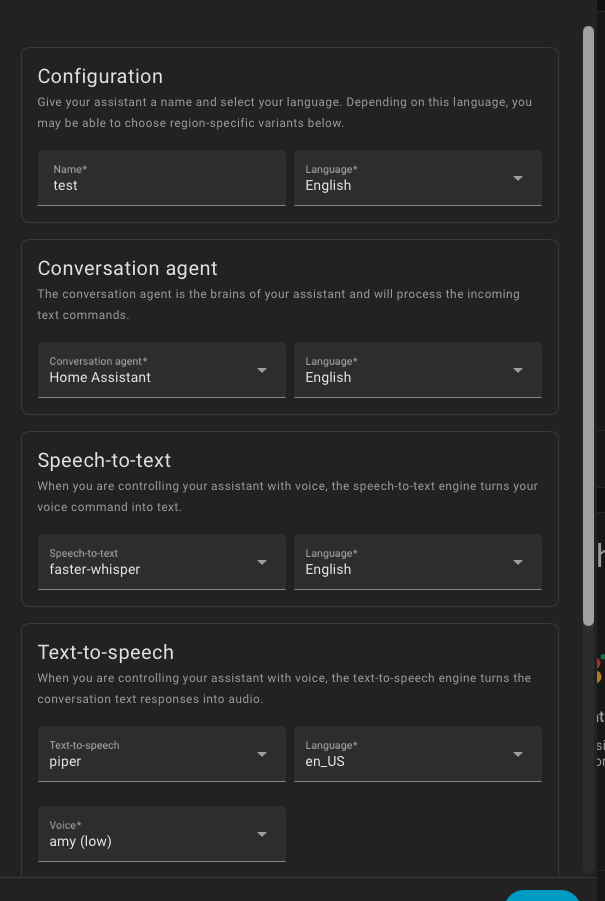
When I say “Okay Nabu”, the light changes to green, then to white, and enters a recursive loop, here is the log…
INFO ESPHome 2025.7.5
INFO Reading configuration /config/esphome/luxe-microww.yaml…
INFO Updating https://github.com/RASPIAUDIO/esphomeLuxe.git@main
WARNING GPIO12 is a strapping PIN and should only be used for I/O with care.
Attaching external pullup/down resistors to strapping pins can cause unexpected failures.
See Frequently Asked Questions - ESPHome - Smart Home Made Simple
WARNING GPIO5 is a strapping PIN and should only be used for I/O with care.
Attaching external pullup/down resistors to strapping pins can cause unexpected failures.
See Frequently Asked Questions - ESPHome - Smart Home Made Simple
WARNING GPIO0 is a strapping PIN and should only be used for I/O with care.
Attaching external pullup/down resistors to strapping pins can cause unexpected failures.
See Frequently Asked Questions - ESPHome - Smart Home Made Simple
INFO Starting log output from 10.0.2.40 using esphome API
INFO Successfully resolved muse-luxe @ 10.0.2.40 in 0.000s
INFO Successfully connected to muse-luxe @ 10.0.2.40 in 0.005s
INFO Successful handshake with muse-luxe @ 10.0.2.40 in 0.094s
[20:29:21][I][app:149]: ESPHome version 2025.7.5 compiled on Sep 24 2025, 20:14:11
[20:29:21][C][wifi:613]: WiFi:
[20:29:21][C][wifi:434]: Local MAC: A0:B7:65:1F:0E:50
[20:29:21][C][wifi:439]: SSID: '**'[redacted]
[20:29:21][C][wifi:442]: IP Address: 10.0.2.40
[20:29:21][C][wifi:446]: BSSID: C8:7F:54:B8:6B:4A[redacted]
[20:29:21][C][wifi:446]: Hostname: ‘muse-luxe’
[20:29:21][C][wifi:446]: Signal strength: -70 dB ▂▄▆█
[20:29:21][C][wifi:455]: Channel: 11
[20:29:21][C][wifi:455]: Subnet: 255.255.252.0
[20:29:21][C][wifi:455]: Gateway: 10.0.1.1
[20:29:21][C][wifi:455]: DNS1: 10.0.1.1
[20:29:21][C][wifi:455]: DNS2: 0.0.0.0
[20:29:21][D][media_player:074]: ‘Raspiaudio Muse Luxe’ - Setting
[20:29:21][D][media_player:084]: Volume: 0.60
[20:29:21][D][main:888]: ==>>>update_led
[20:29:21][D][light:052]: ‘Raspiaudio Muse Luxe’ Setting:
[20:29:21][D][light:069]: Brightness: 100%
[20:29:21][D][light:076]: Red: 100%, Green: 100%, Blue: 0%
[20:29:21][C][logger:246]: Logger:
[20:29:21][C][logger:246]: Max Level: DEBUG
[20:29:21][C][logger:246]: Initial Level: DEBUG
[20:29:21][C][logger:252]: Log Baud Rate: 115200
[20:29:21][C][logger:252]: Hardware UART: UART0
[20:29:21][C][logger:259]: Task Log Buffer Size: 768
[20:29:21][D][media_player:074]: ‘Raspiaudio Muse Luxe’ - Setting
[20:29:21][D][media_player:084]: Volume: 0.60
[20:29:21][D][main:888]: ==>>>update_led
[20:29:21][D][light:052]: ‘Raspiaudio Muse Luxe’ Setting:
[20:29:21][D][light:069]: Brightness: 100%
[20:29:21][D][light:076]: Red: 100%, Green: 100%, Blue: 0%
[20:29:21][C][i2c.idf:083]: I2C Bus:
[20:29:21][C][i2c.idf:084]: SDA Pin: GPIO18
[20:29:21][C][i2c.idf:084]: SCL Pin: GPIO23
[20:29:21][C][i2c.idf:084]: Frequency: 50000 Hz
[20:29:21][C][i2c.idf:094]: Recovery: bus successfully recovered
[20:29:21][I][i2c.idf:104]: Results from bus scan:
[20:29:21][I][i2c.idf:110]: Found device at address 0x10
[20:29:21][I][i2c.idf:110]: Found device at address 0x75
[20:29:21][D][media_player:074]: ‘Raspiaudio Muse Luxe’ - Setting
[20:29:21][D][media_player:084]: Volume: 0.60
[20:29:21][D][main:888]: ==>>>update_led
[20:29:21][D][light:052]: ‘Raspiaudio Muse Luxe’ Setting:
[20:29:21][D][light:069]: Brightness: 100%
[20:29:21][D][light:076]: Red: 100%, Green: 100%, Blue: 0%
[20:29:21][E][speaker_media_player.pipeline:112]: Media reader encountered an error: ESP_ERR_HTTP_CONNECT
[20:29:21][E][speaker_media_player:326]: The announcement pipeline’s file reader encountered an error.
[20:29:21][D][media_player:074]: ‘Raspiaudio Muse Luxe’ - Setting
[20:29:21][D][media_player:084]: Volume: 0.60
[20:29:21][D][main:888]: ==>>>update_led
[20:29:21][D][light:052]: ‘Raspiaudio Muse Luxe’ Setting:
[20:29:21][D][light:069]: Brightness: 100%
[20:29:21][D][light:076]: Red: 100%, Green: 100%, Blue: 0%
[20:29:21][C][gpio.output:010]: Binary Output:
[20:29:21][C][gpio.output:011]: Pin: GPIO21
[20:29:21][D][media_player:074]: ‘Raspiaudio Muse Luxe’ - Setting
[20:29:21][D][media_player:084]: Volume: 0.60
[20:29:21][D][main:888]: ==>>>update_led
[20:29:21][D][light:052]: ‘Raspiaudio Muse Luxe’ Setting:
[20:29:21][D][light:069]: Brightness: 100%
[20:29:22][D][light:076]: Red: 100%, Green: 100%, Blue: 0%
[20:29:22][C][template.sensor:022]: Template Sensor ‘Battery’
[20:29:22][C][template.sensor:022]: State Class: ‘measurement’
[20:29:22][C][template.sensor:022]: Unit of Measurement: ‘%’
[20:29:22][C][template.sensor:022]: Accuracy Decimals: 0
[20:29:22][C][template.sensor:022]: Device Class: ‘battery’
[20:29:22][C][template.sensor:023]: Update Interval: 15.0s
[20:29:22][D][media_player:074]: ‘Raspiaudio Muse Luxe’ - Setting
[20:29:22][D][media_player:084]: Volume: 0.60
[20:29:22][D][main:888]: ==>>>update_led
[20:29:22][D][light:052]: ‘Raspiaudio Muse Luxe’ Setting:
[20:29:22][D][light:069]: Brightness: 100%
[20:29:22][D][light:076]: Red: 100%, Green: 100%, Blue: 0%
[20:29:22][E][speaker_media_player.pipeline:112]: Media reader encountered an error: ESP_ERR_HTTP_CONNECT
[20:29:22][E][speaker_media_player:326]: The announcement pipeline’s file reader encountered an error.
[20:29:22][C][esp32_rmt_led_strip:268]: ESP32 RMT LED Strip:
[20:29:22][C][esp32_rmt_led_strip:268]: Pin: 22
[20:29:22][C][esp32_rmt_led_strip:272]: RMT Symbols: 192
[20:29:22][C][esp32_rmt_led_strip:297]: RGB Order: GRB
[20:29:22][C][esp32_rmt_led_strip:297]: Max refresh rate: 0
[20:29:22][C][esp32_rmt_led_strip:297]: Number of LEDs: 1
[20:29:22][D][media_player:074]: ‘Raspiaudio Muse Luxe’ - Setting
[20:29:22][D][media_player:084]: Volume: 0.60
[20:29:22][D][main:888]: ==>>>update_led
[20:29:22][D][light:052]: ‘Raspiaudio Muse Luxe’ Setting:
[20:29:22][D][light:069]: Brightness: 100%
[20:29:22][D][light:076]: Red: 100%, Green: 100%, Blue: 0%
[20:29:22][C][gpio.binary_sensor:052]: GPIO Binary Sensor ‘Volume Up’
[20:29:22][C][gpio.binary_sensor:053]: Pin: GPIO19
[20:29:22][C][gpio.binary_sensor:055]: Mode: interrupt
[20:29:22][C][gpio.binary_sensor:072]: Interrupt Type: ANY_EDGE
[20:29:22][D][media_player:074]: ‘Raspiaudio Muse Luxe’ - Setting
[20:29:22][D][media_player:084]: Volume: 0.60
[20:29:22][D][main:888]: ==>>>update_led
[20:29:22][D][light:052]: ‘Raspiaudio Muse Luxe’ Setting:
[20:29:22][D][light:069]: Brightness: 100%
[20:29:22][D][light:076]: Red: 100%, Green: 100%, Blue: 0%
[20:29:22][C][gpio.binary_sensor:052]: GPIO Binary Sensor ‘Volume Down’
[20:29:22][C][gpio.binary_sensor:053]: Pin: GPIO32
[20:29:22][C][gpio.binary_sensor:055]: Mode: interrupt
[20:29:22][C][gpio.binary_sensor:072]: Interrupt Type: ANY_EDGE
[20:29:22][D][media_player:074]: ‘Raspiaudio Muse Luxe’ - Setting
[20:29:22][D][media_player:084]: Volume: 0.60
[20:29:22][D][main:888]: ==>>>update_led
[20:29:22][D][light:052]: ‘Raspiaudio Muse Luxe’ Setting:
[20:29:22][D][light:069]: Brightness: 100%
[20:29:22][D][light:076]: Red: 100%, Green: 100%, Blue: 0%
[20:29:22][E][speaker_media_player.pipeline:112]: Media reader encountered an error: ESP_ERR_HTTP_CONNECT
[20:29:22][E][speaker_media_player:326]: The announcement pipeline’s file reader encountered an error.
[20:29:22][C][gpio.binary_sensor:052]: GPIO Binary Sensor ‘Mute’
[20:29:22][C][gpio.binary_sensor:053]: Pin: GPIO12
[20:29:22][C][gpio.binary_sensor:055]: Mode: interrupt
[20:29:22][C][gpio.binary_sensor:072]: Interrupt Type: ANY_EDGE
[20:29:22][D][media_player:074]: ‘Raspiaudio Muse Luxe’ - Setting
[20:29:22][D][media_player:084]: Volume: 0.60
[20:29:22][D][main:888]: ==>>>update_led
[20:29:22][D][light:052]: ‘Raspiaudio Muse Luxe’ Setting:
[20:29:22][D][light:069]: Brightness: 100%
[20:29:22][D][light:076]: Red: 100%, Green: 100%, Blue: 0%
[20:29:22][D][media_player:074]: ‘Raspiaudio Muse Luxe’ - Setting
[20:29:22][D][media_player:084]: Volume: 0.60
[20:29:22][D][main:888]: ==>>>update_led
[20:29:22][D][light:052]: ‘Raspiaudio Muse Luxe’ Setting:
[20:29:22][D][light:069]: Brightness: 100%
[20:29:22][D][light:076]: Red: 100%, Green: 100%, Blue: 0%
[20:29:22][D][media_player:074]: ‘Raspiaudio Muse Luxe’ - Setting
[20:29:22][D][media_player:084]: Volume: 0.60
[20:29:22][D][main:888]: ==>>>update_led
[20:29:22][D][light:052]: ‘Raspiaudio Muse Luxe’ Setting:
[20:29:22][D][light:069]: Brightness: 100%
[20:29:22][D][light:076]: Red: 100%, Green: 100%, Blue: 0%
[20:29:22][E][speaker_media_player.pipeline:112]: Media reader encountered an error: ESP_ERR_HTTP_CONNECT
[20:29:22][E][speaker_media_player:326]: The announcement pipeline’s file reader encountered an error.
[20:29:22][C][light:092]: Light ‘Raspiaudio Muse Luxe’
[20:29:22][C][light:094]: Default Transition Length: 0.0s
[20:29:22][C][light:094]: Gamma Correct: 2.80
[20:29:22][D][media_player:074]: ‘Raspiaudio Muse Luxe’ - Setting
[20:29:22][D][media_player:084]: Volume: 0.60
[20:29:22][D][main:888]: ==>>>update_led
[20:29:22][D][light:052]: ‘Raspiaudio Muse Luxe’ Setting:
[20:29:22][D][light:069]: Brightness: 100%
[20:29:22][D][light:076]: Red: 100%, Green: 100%, Blue: 0%
[20:29:22][D][media_player:074]: ‘Raspiaudio Muse Luxe’ - Setting
[20:29:22][D][media_player:084]: Volume: 0.60
[20:29:22][D][main:888]: ==>>>update_led
[20:29:22][D][light:052]: ‘Raspiaudio Muse Luxe’ Setting:
[20:29:22][D][light:069]: Brightness: 100%
[20:29:22][D][light:076]: Red: 100%, Green: 100%, Blue: 0%
[20:29:22][C][psram:016]: PSRAM:
[20:29:22][C][psram:019]: Available: YES
[20:29:22][C][psram:021]: Size: 8192 KB
[20:29:22][D][media_player:074]: ‘Raspiaudio Muse Luxe’ - Setting
[20:29:22][D][media_player:084]: Volume: 0.60
[20:29:22][D][main:888]: ==>>>update_led
[20:29:22][D][light:052]: ‘Raspiaudio Muse Luxe’ Setting:
[20:29:22][D][light:069]: Brightness: 100%
[20:29:22][D][light:076]: Red: 100%, Green: 100%, Blue: 0%
[20:29:22][E][speaker_media_player.pipeline:112]: Media reader encountered an error: ESP_ERR_HTTP_CONNECT
[20:29:22][E][speaker_media_player:326]: The announcement pipeline’s file reader encountered an error.
[20:29:22][D][media_player:074]: ‘Raspiaudio Muse Luxe’ - Setting
[20:29:22][D][media_player:084]: Volume: 0.60
[20:29:22][D][main:888]: ==>>>update_led
[20:29:22][D][light:052]: ‘Raspiaudio Muse Luxe’ Setting:
[20:29:22][D][light:069]: Brightness: 100%
[20:29:22][D][light:076]: Red: 100%, Green: 100%, Blue: 0%
[20:29:22][C][adc.esp32:065]: ADC Sensor ‘Battery voltage’
[20:29:22][C][adc.esp32:065]: State Class: ‘measurement’
[20:29:22][C][adc.esp32:065]: Unit of Measurement: ‘V’
[20:29:22][C][adc.esp32:065]: Accuracy Decimals: 2
[20:29:22][C][adc.esp32:065]: Device Class: ‘voltage’
[20:29:22][C][adc.esp32:066]: Pin: GPIO33
[20:29:22][C][adc.esp32:087]: Attenuation: auto
[20:29:22][C][adc.esp32:087]: Samples: 1
[20:29:22][C][adc.esp32:087]: Sampling mode: average
[20:29:22][C][adc.esp32:092]: Update Interval: 15.0s
[20:29:22][D][media_player:074]: ‘Raspiaudio Muse Luxe’ - Setting
[20:29:22][D][media_player:084]: Volume: 0.60
[20:29:22][D][main:888]: ==>>>update_led
[20:29:22][D][light:052]: ‘Raspiaudio Muse Luxe’ Setting:
[20:29:22][D][light:069]: Brightness: 100%
[20:29:22][D][light:076]: Red: 100%, Green: 100%, Blue: 0%
[20:29:22][D][media_player:074]: ‘Raspiaudio Muse Luxe’ - Setting
[20:29:22][D][media_player:084]: Volume: 0.60
[20:29:22][D][main:888]: ==>>>update_led
[20:29:22][D][light:052]: ‘Raspiaudio Muse Luxe’ Setting:
[20:29:22][D][light:069]: Brightness: 100%
[20:29:22][D][light:076]: Red: 100%, Green: 100%, Blue: 0%
[20:29:22][E][speaker_media_player.pipeline:112]: Media reader encountered an error: ESP_ERR_HTTP_CONNECT
[20:29:22][E][speaker_media_player:326]: The announcement pipeline’s file reader encountered an error.
[20:29:22][C][i2s_audio.microphone:080]: Microphone:
[20:29:22][C][i2s_audio.microphone:080]: Pin: 35
[20:29:22][C][i2s_audio.microphone:080]: PDM: NO
[20:29:22][C][i2s_audio.microphone:080]: DC offset correction: NO
[20:29:22][D][media_player:074]: ‘Raspiaudio Muse Luxe’ - Setting
[20:29:22][D][media_player:084]: Volume: 0.60
[20:29:22][D][main:888]: ==>>>update_led
[20:29:22][D][light:052]: ‘Raspiaudio Muse Luxe’ Setting:
[20:29:22][D][light:069]: Brightness: 100%
[20:29:22][D][light:076]: Red: 100%, Green: 100%, Blue: 0%
[20:29:22][D][media_player:074]: ‘Raspiaudio Muse Luxe’ - Setting
[20:29:22][D][media_player:084]: Volume: 0.60
[20:29:22][D][main:888]: ==>>>update_led
[20:29:22][D][light:052]: ‘Raspiaudio Muse Luxe’ Setting:
[20:29:22][D][light:069]: Brightness: 100%
[20:29:22][D][light:076]: Red: 100%, Green: 100%, Blue: 0%
[20:29:22][D][media_player:074]: ‘Raspiaudio Muse Luxe’ - Setting
[20:29:22][D][media_player:084]: Volume: 0.60
[20:29:22][D][main:888]: ==>>>update_led
[20:29:22][D][light:052]: ‘Raspiaudio Muse Luxe’ Setting:
[20:29:22][D][light:069]: Brightness: 100%
[20:29:23][D][light:076]: Red: 100%, Green: 100%, Blue: 0%
[20:29:23][E][speaker_media_player.pipeline:112]: Media reader encountered an error: ESP_ERR_HTTP_CONNECT
[20:29:23][E][speaker_media_player:326]: The announcement pipeline’s file reader encountered an error.
[20:29:23][D][media_player:074]: ‘Raspiaudio Muse Luxe’ - Setting
[20:29:23][D][media_player:084]: Volume: 0.60
[20:29:23][D][main:888]: ==>>>update_led
[20:29:23][D][light:052]: ‘Raspiaudio Muse Luxe’ Setting:
[20:29:23][D][light:069]: Brightness: 100%
[20:29:23][D][light:076]: Red: 100%, Green: 100%, Blue: 0%
[20:29:23][D][media_player:074]: ‘Raspiaudio Muse Luxe’ - Setting
[20:29:23][D][media_player:084]: Volume: 0.60
[20:29:23][D][main:888]: ==>>>update_led
[20:29:23][D][light:052]: ‘Raspiaudio Muse Luxe’ Setting:
[20:29:23][D][light:069]: Brightness: 100%
[20:29:23][D][light:076]: Red: 100%, Green: 100%, Blue: 0%
[20:29:23][D][media_player:074]: ‘Raspiaudio Muse Luxe’ - Setting
[20:29:23][D][media_player:084]: Volume: 0.60
[20:29:23][D][main:888]: ==>>>update_led
[20:29:23][D][light:052]: ‘Raspiaudio Muse Luxe’ Setting:
[20:29:23][D][light:069]: Brightness: 100%
[20:29:23][D][light:076]: Red: 100%, Green: 100%, Blue: 0%
[20:29:23][E][speaker_media_player.pipeline:112]: Media reader encountered an error: ESP_ERR_HTTP_CONNECT
[20:29:23][E][speaker_media_player:326]: The announcement pipeline’s file reader encountered an error.
[20:29:23][C][i2s_audio.speaker:114]: Speaker:
[20:29:23][C][i2s_audio.speaker:114]: Pin: 26
[20:29:23][C][i2s_audio.speaker:114]: Buffer duration: 100
[20:29:23][C][i2s_audio.speaker:120]: Timeout: 500 ms
[20:29:23][C][i2s_audio.speaker:128]: Communication format: std
[20:29:23][D][media_player:074]: ‘Raspiaudio Muse Luxe’ - Setting
[20:29:23][D][media_player:084]: Volume: 0.60
[20:29:23][D][main:888]: ==>>>update_led
[20:29:23][D][light:052]: ‘Raspiaudio Muse Luxe’ Setting:
[20:29:23][D][light:069]: Brightness: 100%
[20:29:23][D][light:076]: Red: 100%, Green: 100%, Blue: 0%
[20:29:23][D][media_player:074]: ‘Raspiaudio Muse Luxe’ - Setting
[20:29:23][D][media_player:084]: Volume: 0.60
[20:29:23][D][main:888]: ==>>>update_led
[20:29:23][D][light:052]: ‘Raspiaudio Muse Luxe’ Setting:
[20:29:23][D][light:069]: Brightness: 100%
[20:29:23][D][light:076]: Red: 100%, Green: 100%, Blue: 0%
[20:29:23][D][media_player:074]: ‘Raspiaudio Muse Luxe’ - Setting
[20:29:23][D][media_player:084]: Volume: 0.60
[20:29:23][D][main:888]: ==>>>update_led
[20:29:23][D][light:052]: ‘Raspiaudio Muse Luxe’ Setting:
[20:29:23][D][light:069]: Brightness: 100%
[20:29:23][D][light:076]: Red: 100%, Green: 100%, Blue: 0%
[20:29:23][E][speaker_media_player.pipeline:112]: Media reader encountered an error: ESP_ERR_HTTP_CONNECT
[20:29:23][E][speaker_media_player:326]: The announcement pipeline’s file reader encountered an error.
…
Just a quick reminder about the meaning of the LED color:
Purple => initialization
Blue (blinking) => waiting for WakeWord
Green => WW recognized, waiting for the question
Yellow => response in progress (STT-> LLM-> TTS)
Orange => Player On
Red => error
The error, in your case, occurs during the response.
You could check your STT and TTS
And also try a very simple configuration, for example:
Conversation agent => Home Assistant
Speech-to-text => Home Assistant Cloud
Text-to-speech => Home Assistant Cloud
Keep me posted on your progress…
I changed to:
Speech-to-text => “Gemini Cloud”
Text-to-speech => “Google Translate en com”
and it works now
Thanks!
Hello,
I wanted to flash the latest version onto my Muse today, but I keep getting stuck in a boot loop.
It doesn’t matter whether I try it from HomeAssistant, via https://raspiaudio.github.io/, or with the binary via https://web.esphome.io/.
At the moment, I have a very expensive paperweight.
Here is an excerpt from the log files:
ELF file SHA256: 912176c1c

Rebooting...
ets Jul 29 2019 12:21:46

rst:0xc (SW_CPU_RESET),boot:0x17 (SPI_FAST_FLASH_BOOT)
configsip: 0, SPIWP:0xee
clk_drv:0x00,q_drv:0x00,d_drv:0x00,cs0_drv:0x00,hd_drv:0x00,wp_drv:0x00
mode:DIO, clock div:2
load:0x3fff0030,len:7176
load:0x40078000,len:15564
ho 0 tail 12 room 4
load:0x40080400,len:4
load:0x40080404,len:3904
entry 0x40080638
I (31) boot: ESP-IDF 5.3.2 2nd stage bootloader
I (31) boot: compile time Oct  1 2025 11:02:56
I (31) boot: Multicore bootloader
I (35) boot: chip revision: v3.1
I (39) boot.esp32: SPI Speed      : 40MHz
I (44) boot.esp32: SPI Mode       : DIO
I (48) boot.esp32: SPI Flash Size : 8MB
I (53) boot: Enabling RNG early entropy source...
I (58) boot: Partition Table:
I (62) boot: ## Label            Usage          Type ST Offset   Length
I (69) boot:  0 otadata          OTA data         01 00 00009000 00002000
I (76) boot:  1 phy_init         RF data          01 01 0000b000 00001000
I (84) boot:  2 app0             OTA app          00 10 00010000 001c0000
I (91) boot:  3 app1             OTA app          00 11 001d0000 001c0000
I (99) boot:  4 nvs              WiFi data        01 02 00390000 0006d000
I (106) boot: End of partition table
I (111) esp_image: segment 0: paddr=00010020 vaddr=3f400020 size=6a108h (434440) map
I (268) esp_image: segment 1: paddr=0007a130 vaddr=3ffb0000 size=04228h ( 16936) load
I (275) esp_image: segment 2: paddr=0007e360 vaddr=40080000 size=01cb8h (  7352) load
I (278) esp_image: segment 3: paddr=00080020 vaddr=400d0020 size=fd9a4h (1038756) map
I (638) esp_image: segment 4: paddr=0017d9cc vaddr=40081cb8 size=195f8h (103928) load
I (693) boot: Loaded app from partition at offset 0x10000
I (693) boot: Disabling RNG early entropy source...
I (705) quad_psram: This chip is ESP32-D0WD
I (705) esp_psram: Found 8MB PSRAM device
I (706) esp_psram: Speed: 40MHz
I (709) esp_psram: PSRAM initialized, cache is in low/high (2-core) mode.
W (716) esp_psram: Virtual address not enough for PSRAM, map as much as we can. 4MB is mapped
I (725) cpu_start: Multicore app
I (1610) esp_psram: SPI SRAM memory test OK
I (1618) cpu_start: Pro cpu start user code
I (1618) cpu_start: cpu freq: 160000000 Hz
I (1619) app_init: Application information:
I (1622) app_init: Project name:     muse-luxe
I (1627) app_init: App version:      2025.7.5
I (1632) app_init: Compile time:     Oct  1 2025 10:59:08
I (1638) app_init: ELF file SHA256:  912176c1c...
I (1643) app_init: ESP-IDF:          5.3.2
I (1648) efuse_init: Min chip rev:     v0.0
I (1653) efuse_init: Max chip rev:     v3.99
I (1658) efuse_init: Chip rev:         v3.1
I (1663) heap_init: Initializing. RAM available for dynamic allocation:
I (1670) heap_init: At 3FFAE6E0 len 00001920 (6 KiB): DRAM
I (1676) heap_init: At 3FFB93B0 len 00026C50 (155 KiB): DRAM
I (1683) heap_init: At 3FFE0440 len 00003AE0 (14 KiB): D/IRAM
I (1689) heap_init: At 3FFE4350 len 0001BCB0 (111 KiB): D/IRAM
I (1696) heap_init: At 4009B2B0 len 00004D50 (19 KiB): IRAM
I (1702) esp_psram: Adding pool of 4096K of PSRAM memory to heap allocator
I (1711) spi_flash: detected chip: generic
I (1714) spi_flash: flash io: dio
E (1718) spi_flash: Detected size(4096k) smaller than the size in the binary image header(8192k). Probe failed.

assert failed: __esp_system_init_fn_init_flash startup_funcs.c:95 (flash_ret == ESP_OK)


Backtrace: 0x4008485d:0x3ffe3a80 0x4008dbe1:0x3ffe3aa0 0x40094f89:0x3ffe3ac0 0x4013baaf:0x3ffe3be0 0x4013d4de:0x3ffe3c00 0x4013d516:0x3ffe3c20 0x40083f09:0x3ffe3c50 0x4007966a:0x3ffe3c90 |<-CORRUPTED